
NADRA SIM Owner Details: Check SIM Registration through CNIC in Pakistan
If you are trying to search NADRA SIM Owner Details, it is possible that you are looking to verify which SIMs are registered against your CNIC, or are looking to check if a given SIM is registered in your own name.
It is important to note here that NADRA is Pakistan’s national identity authority, not a public directory for searching another person’s private SIM information. NADRA provides identity registration and verification services (biometric verification), while SIM registration and telecom services fall under Pakistan’s telecom regulatory framework.
Read Also: Check SIM Owner Details by CNIC Online in Pakistan
If you need to verify the SIMs linked against your CNIC, do so through official PTA-recommended means or by contacting directly with your operator to get the information. Refrain from using such sites which sell access to “databases of private SIM owners” or provide full CNIC details of a number’s owner.
Check: Sim Owner Details Pakistan
What Are NADRA SIM Owner Details?
The term NADRA SIM Owner Details is used when someone needs to get details of an individual whose credentials are linked against a mobile SIM.
These require registration of the mobile connection along with subscriber information and verification of the subscriber’s details according to the prescribed procedure.
Depending on the service and authorized access, SIM registration records may be associated with information such as:
- Subscriber identity information
- CNIC-related registration records
- Mobile network details
- SIM registration status
- Information used for identity verification
However, the fact that these records are available doesn’t mean that they are publicly searchable.
A genuine SIM verification service is meant to aid you in verifying connections that belong to your own identity, not reveal another persons’ private CNIC, address, family information or telecom records.
Does NADRA Have a Public SIM Owner Database?
No. NADRA does not facilitate a public directory where individuals can enter a mobile number and access someone else’s private SIM owner information.
NADRA’s primary functions involve national identity registration and verification, with its identity verification system being utilized for authorized processes such as biometric verification,
which is distinct from a public mobile-number lookup database.
You may find websites using terms such as:
- NADRA SIM database
- NADRA SIM owner details
- SIM owner details by number
- CNIC owner lookup
- SIM database search
- Complete SIM information
The use of the word NADRA in a website’s title does not make that website an official NADRA service.
If your objective is to check whether SIMs are registered against your own CNIC, use an official telecom verification channel instead.
How to Check SIMs Registered Against Your CNIC
If you are concerned that an old, unused, or unfamiliar SIM may be registered against your CNIC, checking your registration record should be your first step.
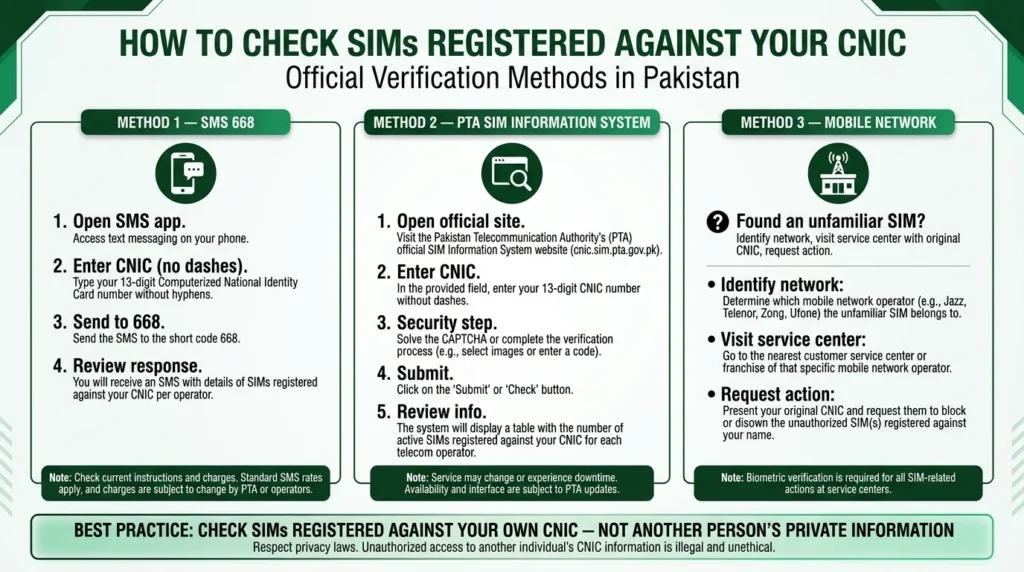
Method 1: Check Through SMS 668
The 668 SMS method has been used for checking SIMs issued in a person’s name.
The general process is:
- Open the SMS application on your mobile phone.
- Enter your CNIC number without dashes.
- Send the CNIC number to 668.
- Review the response containing the available SIM-registration information.
This can help you identify whether the number of SIM connections associated with your CNIC matches your expectations.
Because telecom services and charges can change, verify the current instructions and applicable SMS charges before using the service.
Read Also: 667 SIM Check in Pakistan: 667 vs 668, MNP & SIM Verification
Method 2: Use the PTA SIM Information System
The PTA SIM Information System provides an online way to check SIM registration information associated with your CNIC.
The information displayed can include network-wise SIM counts or registration information available through the system.
To use the online service:
- Open the official SIM Information System.
- Enter the requested CNIC information.
- Complete any verification or security step displayed.
- Submit the request.
- Review the SIM information associated with your CNIC.
The exact interface and information shown may change as the service is updated.
Method 3: Contact Your Mobile Network
If your CNIC check shows a SIM or connection that you do not recognize, contacting the relevant mobile operator is the most appropriate next step.
Take your original CNIC to the operator’s official customer service center or authorized franchise.
After verifying your identity, the operator can explain the available process for an unfamiliar registration and whether the connection can be blocked, closed, or otherwise corrected.
Can You Check the Owner of Any Mobile Number?
This is one of the most misunderstood parts of SIM verification in Pakistan.
There is no legitimate public NADRA directory that allows anyone to enter another person’s mobile number and retrieve their complete private identity information.
Be particularly cautious of websites or applications claiming that they can reveal another person’s:
- CNIC number
- Home address
- Family information
- Complete subscriber profile
- Private telecom records
- Personal details linked to a phone number
A mobile number being registered with a CNIC does not make the subscriber’s private information publicly available.
If you receive suspicious, threatening, or unwanted calls, use the appropriate telecom or legal reporting channel instead of trying to obtain the caller’s private identity through an unofficial database.
Read Also: Check SIM Owner Details by Number in Pakistan (Official Methods 2026)
What Information Is Linked to SIM Registration?
A registered SIM is associated with subscriber information maintained as part of the telecommunications service.
The amount of information that can be accessed depends on who is requesting it, why it is being requested, and what authorization applies.
For ordinary users, the important distinction is:
SIM registration information exists, but it is not the same as publicly available personal information.
This is why official SIM-checking services focus on helping users verify connections associated with their own identity.
Why Is Biometric Verification Important for SIM Registration?
Biometric verification provides an additional layer of identity authentication during applicable SIM-registration processes.
NADRA’s biometric verification services are designed to match biometric information with identity records for authorized verification purposes.
In the telecommunications context, identity verification helps reduce the risk of SIMs being issued through fraudulent or unauthorized registrations.
It can help address risks such as:
- Unauthorized SIM issuance
- Identity misuse
- Fraudulent registrations
- Improper subscriber verification
- Connections issued without the genuine subscriber’s knowledge
Consumers should also be careful when providing fingerprints or other identity information during SIM-related processes and should use authorized channels.
Read Also: Biometric SIM Verification in Pakistan: Complete Guide (2026)
How Many SIMs Can Be Registered on One CNIC?
The number of SIM connections registered against a single CNIC is determined by telecom regulations.
Since these regulations are subject to change, it would be best to confirm the latest PTA limit rather than relying on a possibly out-of-date source as mentioned in the above article.
If the operator deems that you have reached the upper limit of CNIC allowed connections, ask them to elaborate which connections are attributed to your CNIC and what procedure should be undertaken to remove a connection that is no longer in use/unwanted.
For average users, a more pressing concern would be:
Which SIMs are currently registered against my CNIC?
Regular audits of your registration information can help you discover connections that you no longer use / don’t recognize.
Read Also: How Many SIMs on My CNIC Check Online
What to Do If You Find an Unknown SIM on Your CNIC
Finding an unfamiliar SIM registration should not be ignored.
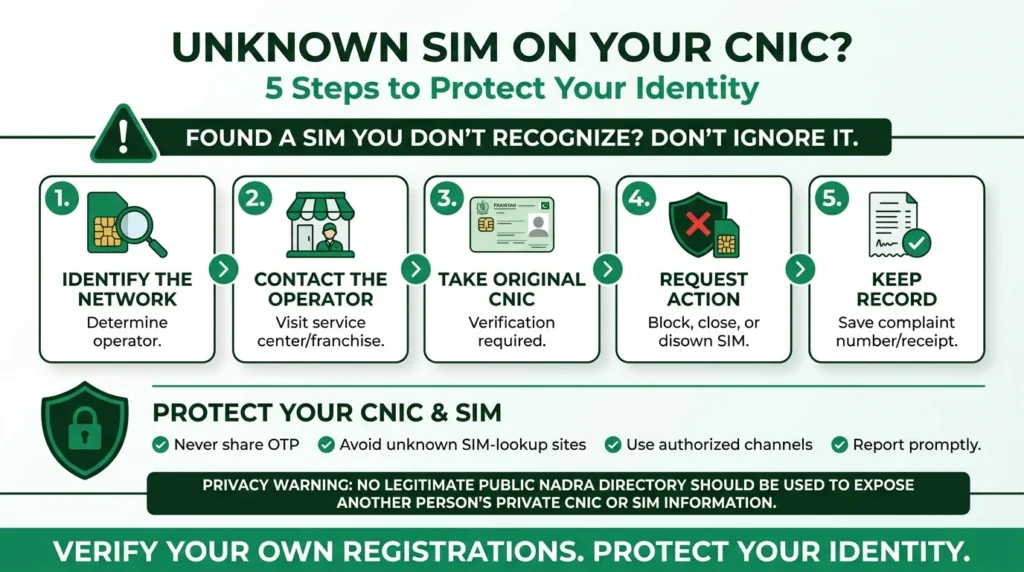
1. Identify the Mobile Network
Determine which network is associated with the unfamiliar registration.
2. Contact the Operator
Visit the operator’s official customer service center or authorized franchise.
3. Take Your Original CNIC
You may need to complete identity verification before the operator can process your request.
4. Explain the Problem Clearly
Inform them that you do not recognize the SIM or connection against your CNIC.
Inquire about the procedure for blocking, closing, disowning, or correction of the registration, depending upon your case.
5. Keep Your Complaint Record
Keep a record of any complaint number, receipt, SMS confirmation, or any other proof given by the operator.
If you are sure that someone is misusing your CNIC without your permission, or in case of fraud, you can file a formal complaint in this regard.
How to Protect Your CNIC and SIM Registration
Your CNIC is an important identity document, so it is worth taking simple precautions when dealing with SIM registration.
- Do not enter your CNIC on unknown SIM-lookup websites.
- Avoid services claiming to expose private SIM-owner information.
- Never share an OTP or verification code with another person.
- Use authorized channels for SIM purchases and verification.
- Be cautious when providing biometric information.
- Periodically check the SIMs registered against your CNIC.
- Report unfamiliar registrations promptly.
- Keep your active SIM cards under your own control.
- Do not install unfamiliar applications that claim to provide private SIM databases.
If a service asks for unnecessary personal information or promises to reveal someone’s complete identity from a phone number, treat it as a warning sign.
NADRA vs PTA vs Mobile Operators
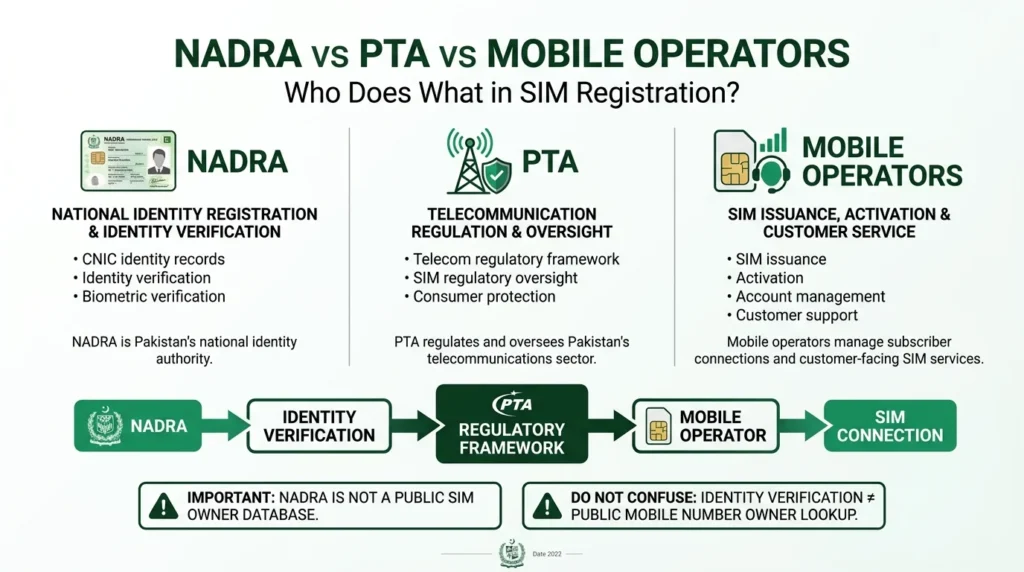
| Organization | Main Role |
| NADRA | National identity registration and identity verification |
| PTA | Regulation and oversight of Pakistan’s telecommunications sector |
| Mobile Operators | SIM issuance, activation, account management, and customer support |
(NADRA) is responsible for verifying identity, PTA – for regulating telecom operators, and mobile operators – for maintaining connections through SIM cards. Knowing who does what makes it much easier to find the right one and not waste time looking for a so-called “NADRA database for SIM cards”.
Is It Safe to Use Third-Party SIM Owner Websites?
you should be very careful on sites that provide sim owner information from a number
Before you type in your CNIC or any private information, ask yourself these questions:
- is the website run by a legit authority,
- does it explain why they need your information,
- does it ask for more information than needed,
- does it tell you its going to show you another persons private information,
- does it tell you to download an unknown application,
- and does it tell you what it does with the information you give it.
A website that tells you it can show you all information on a person from a cell phone number, including their CNIC, address and family members, shouldn’t be trusted just because it says it’s backed by NADRA, PTA, or SIM database. For your own safety, it is better to stay away from these sites, and use official government sources
NADRA SIM Owner Details: Official vs Unofficial Methods
It helps to distinguish between legitimate verification and unofficial lookup services.
| Method | Suitable for checking your own SIM registration? | Privacy risk |
| Official PTA-supported SIM verification | Yes | Lower |
| Mobile operator customer service | Yes | Lower |
| Authorized biometric verification | Yes, where applicable | Controlled |
| Unknown SIM-owner website | No | Higher |
| Website claiming to reveal another person’s CNIC | No | High |
| Unofficial mobile-number database | No | High |
The safest approach is to use a service that verifies your own identity and registrations, rather than one promising access to someone else’s private records.
Frequently Asked Questions
Can I check NADRA SIM Owner Details online?
You can check SIM registrations associated with your own CNIC through applicable official telecom verification channels. NADRA does not operate a public directory for searching another person’s private mobile information.
Can I find the owner of a mobile number?
A legitimate public NADRA service does not provide another person’s complete private identity information simply from their mobile number.
Does NADRA register SIM cards?
NADRA’s role is primarily related to national identity registration and identity verification. SIM services are provided by mobile operators within the telecommunications framework regulated by PTA.
How can I check SIMs registered against my CNIC?
You can use available PTA-supported verification methods, including the 668 SMS method and the online SIM Information System, subject to the current availability and instructions of those services.
What should I do if an unknown SIM appears on my CNIC?
Contact the relevant mobile operator with your original CNIC and ask them to investigate the registration. Keep any complaint or transaction records you receive.
Can I get someone’s CNIC from their phone number?
You should not trust websites or applications claiming that they can provide another person’s CNIC from a mobile number. Private identity information is not intended to function as a public SIM lookup service.
Is SIM verification free?
The cost depends on the method and service being used. SMS-based services may have applicable charges, so check the current terms before submitting a request.
Can I check SIMs registered against someone else’s CNIC?
Official SIM verification is intended for authorized identity checks. You should not attempt to obtain another person’s private SIM-registration information without proper authorization.
Conclusion
NADRA SIM Owner Detail, is a great search term. But it should shed light on the difference between identity verification and public SIM-owner searching.
NADRA is the federal regulator for national identity verification while PTA is the regulatory authority for telecom sector policy implementation. As such, they have different mandates. For SIM owner verification, the cellular operator you subscribe to is the relevant state agency.
Therefore, if you suspect that your CNIC is unknowingly registered against a particular SIM card, use the official SIM verification tool. You may then get in touch with your cellular network provider to disconnect the line if it is found to be connected to your CNIC.
Most importantly, you must be wary of sites that ask for a phone number to display private information like CNIC, address, family members, and subscriber details. By contrast, a good SIM lookup tool should help you safeguard your identity.