
How to Reactivate a Blocked SIM Card: Complete Guide 2026
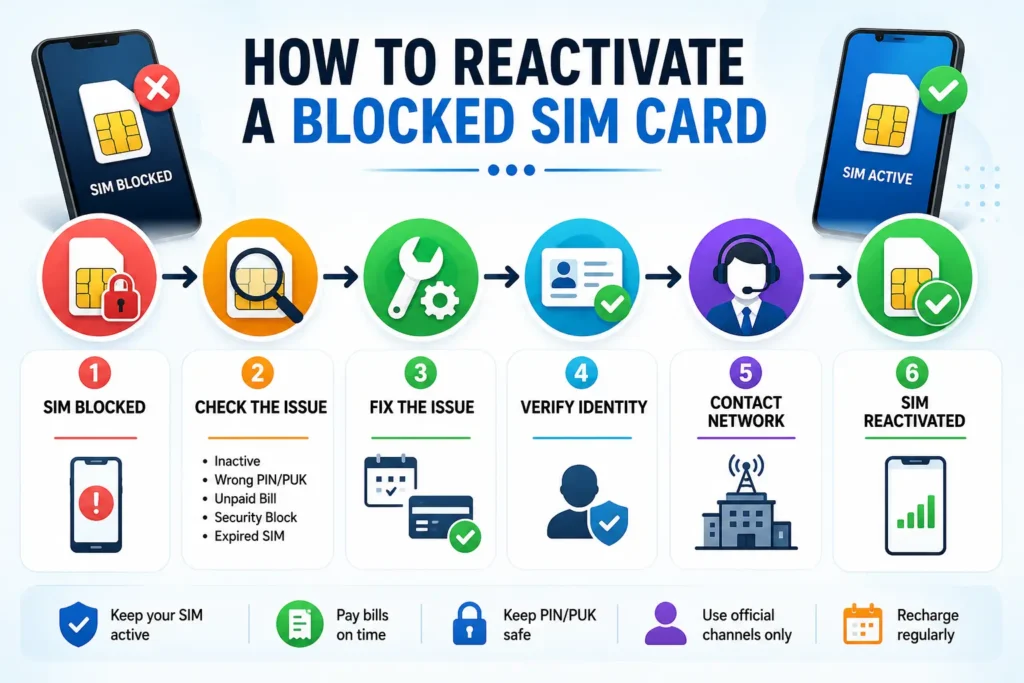
A blocked SIM can be reactivated, but it depends on the reason it stopped working. Common causes include long-term inactivity, unpaid bills, incorrect PIN, or PUK code attempts. In many cases, the operator can restore the SIM card after the issue has been resolved. The reactivation process depends on your network provider.You may need to verify your identity, clear pending payments, or complete additional steps before the carrier restores your service.
In this guide, you will get all the steps that explain why your SIM card blocks, how you can recover it with every single step, and how you can protect your SIM card in the future to avoid any blockage.
More: Block Unauthorized SIM Online in Pakistan
Can a Blocked SIM Card Be Reactivated?
In most cases, yes.
- Carriers often block SIM cards for account, billing, security, or inactivity reasons. You can reactivate most blocked SIM cards after you fix the original problem and your carrier completes the reactivation process. Once you resolve the issue, most carriers can restore your SIM service.
- In some circumstances, you cannot reactivate a blocked SIM card. If you leave a card inactive for a very long time, the carrier may reassign the number to a new owner. The same happens when a customer exceeds the allowed number of wrong PUK entries, barring them from using that particular SIM. Therefore, you should identify the exact reason why the carrier blocked your SIM card.
This will save time and effort required to reactivate the SIM. SIM reactivation policies vary by mobile carrier and country. Always confirm the latest requirements with your network provider.
Blocked vs Locked vs Suspended vs Expired SIM
| SIM Status | Meaning | Can It Be Fixed? |
| Blocked | Restricted because of billing, security, or account issues | Usually Yes |
| Locked | Wrong PIN entered; PUK code required | Yes |
| Suspended | Service temporarily stopped | Yes |
| Expired | SIM inactive beyond the allowed period | Sometimes |
Knowing your SIM status helps you choose the right solution.
5 Common Reasons Your SIM Card Stopped Working
A reason why a SIM card may stop working could be because the subscriber has not used the card for a period of time. Some issues are solved in a matter of minutes, while some are dependent on the mobile carrier.
1. SIM Inactivity
A carrier can deactivate a SIM card that is inactive for an extended period of time. This happens with a prepaid SIM card that has been inactive for a substantially long time for making calls, sending messages, or topping up the balance.
If the subscriber did not change the number, then it can be reactivated by the mobile network operator.
More: SIM Owner Detail Pakistan
2. Incorrect PIN or PUK
Entering the wrong PIN three times locks the SIM card.
In order to unlock it, you will have to enter a PUK code provided by your carrier. Wrong PUK code entries will permanently block the SIM.
3. Unpaid Bills
If you sign up for a postpaid plan, your bills have to be paid for you to continue using the service.
However, paying off the overdue amount typically reactivates the service, unless your carrier asks you to reactivate the service.
4. Security Restrictions
Your SIM card may have been blocked by your carrier for some reason. This can occur if they suspect that you have a swapped SIM, or if they detect suspicious account activity or a possible SIM swap.
Your carrier should be able to unblock your SIM once you verify who you are.
5. Expired SIM
How to Determine the Exact Issue
Make sure to look at the message that appears on the screen.
| Message | Meaning |
| Incorrect PIN | Wrong PIN entered several times |
| PUK Required | SIM is locked |
| SIM Not Registered | SIM has been deactivated |
| No Service | Network or account issue |
| Invalid SIM | SIM may be damaged or inactive |
Ask yourself these questions:
- Have you used this SIM recently?
- Did you miss a payment?
- Did you recently change phones?
- Did you enter the wrong PIN?
- Did your carrier send any warning messages?
If your confusion remains, you can always log in to your carrier account directly on their website or through their application to see what is going on with your subscription. Moreover, if none of the suggestions helped, you can contact your carrier and ask them to explain why they blocked your SIM card and how you can reactivate it.
How to Reactivate a Blocked SIM Card
The correct solution depends on why your SIM stopped working. Choose the solution below based on the reason your SIM was blocked:
1. How to Reactivate an Inactive SIM
If your SIM has been inactive for several months, your carrier may have deactivated it.
- Check whether your number is available
- Request SIM reactivation if your number is still available.
- Complete any necessary identification
- Recharge your account, if asked
- Restart your device after confirmation
More: How to Replace a Lost or Stolen SIM Card in Pakistan
2. How to Unlock a SIM After Entering the Wrong PIN
Instead,d try to find your PUK code using your carrier’s application or website. SIM card packaging or customer support. After this, enter the code and set a new PIN.
A wrong PUK code entry can block your SIM card permanently.
3. How to Reactivate a SIM Blocked Due to Unpaid Bills
If your service is suspended or blocked due to overdue payment:
- Log in to your carrier’s website/account.
- Check the overdue balance.
- Make the payment.
- Wait for the payment to go through.
- Reboot the phone.
Most carriers will reactivate the service automatically; if the SIM card still does not operate properly, the user should contact the carrier’s support and ask them to refresh the account.
4. How to Remove a Security Block
Mobile operators can block SIM cards to protect the user from illegal activities and unauthorized use of the phone. This happens when the operator notices any fraud, SIM swap requests, or illegal login attempts.
- Contact the carrier immediately and provide the necessary information to verify your identity (e. g., name, birthday, ID, etc)
- Ask the carrier to reactivate the SIM card according to the instructions given by the person answering the call.
- Wait until the SIM card ban is lifted by the carrier.
5. How to Recover an Expired SIM Card
- Call the carrier company right away.
- Ask whether your number is available.
- You can attempt to reactivate the SIM card.
- Moreover, you may be asked to verify your identity.
In case of changing the line due to a new SIM card, you will be assigned a new number.
Pro Tip: The faster you contact your carrier, the higher the chance of saving your number.
Signs Your SIM Card Can Still Be Recovered
Your SIM can usually be reactivated if
- Your phone number is still assigned to your account,
- Your SIM was recently blocked,
- You can verify your identity,
- Your carrier hasn’t ported your number
- Your account is still active.
If these conditions apply, your chances of recovering the SIM are usually good.
When SIM Reactivation Isn’t Possible
-
The carrier has reassigned your phone number to another party.
- A permanently blocked SIM card due to too many invalid PUK code attempts cannot be unlocked. You will need to contact your network provider to request a replacement SIM card
- Your account has been terminated due to permanent cancellation.
- SIM unlock pin recovery period has expired.
- SIM was cancelled and cannot be reactivated.
Can You Keep Your Old Phone Number?
Yes, in many cases.
Keeping your current phone number is possible when:
- The number wasn’t reassigned
- The SIM wasn’t inactive for an extended period
- You have successfully verified your identity.
- Your carrier hasn’t canceled the number.
More: How to Transfer SIM Ownership Online in Pakistan
How Long Does SIM Reactivation Take?
| Situation | Estimated Time |
| Wrong PIN unlocked with PUK | 5–10 minutes |
| Unpaid bill | 10–60 minutes |
| Online reactivation | 30 minutes–24 hours |
| Identity verification | 1–3 business days |
| Replacement SIM | 1–5 business days |
| Expired SIM recovery | Depends on the carrier |
Common Mistakes to Avoid
Avoid Leaving Your SIM Inactive
The longer the SIM card stays inactive, the greater the likelihood of losing the subscriber’s number.
Avoid Trying Different Passwords and Pins
Many attempts to determine the correct password or PIN can cause you to block your SIM card permanently. Therefore, if you have forgotten your password or PI, N it is necessary to contact your customer support…
Ignoring Carrier Messages
Using Third-Party Unlock Services
Only your mobile carrier can officially reactivate a blocked SIM. Avoid websites that promise instant SIM unlocking for a fee.
Assuming the SIM Is Damaged
A blocked SIM isn’t always faulty. Check your account status before buying a replacement SIM.
Important: Never share your OTP, PIN, or PUK code with anyone claiming to unlock your SIM.
Conclusion
A blocked SIM card does not necessarily mean that you have lost the number.
If the basic fixes don’t work, contact your carrier.
FAQs
Is it possible to unblock a SIM card online?
The user can unblock the SIM card online via the carrier’s website or app. Mostly, the network provider requires the customer to identify themselves or pay back some charges to unlock the phone’s SIM.
Why did my SIM card get blocked?
How do I know if my SIM is blocked?
Is it possible to use a blocked SIM card in another phone?
The user can use his blocked SIM card in other phones to check if it is defective or not. In contrast, a phone cannot accept a blocked SIM card due to its status.