
PTA WhatsApp SIM Advisory 2026
PTA WhatsApp SIM Advisory: Messages about impending WhatsApp blocks in Pakistan were spreading like wildfire in 2026. Some social media posts claimed that WhatsApp will cease to exist for everyone, while others warned that WhatsApp users would have to migrate their WhatsApp accounts to a SIM registered in their own name before a particular date.
The reality of the situation, however, is not as dramatic.
The PTA warnings related to WhatsApp accounts associated with inactive, cancelled, blocked, or unverified SIMs. The issue of concern is what happens when a mobile number is cancelled or abandoned and re-issued to another subscriber.
So, is WhatsApp being banned across Pakistan? No blanket WhatsApp ban or nationwide deadline has been announced in the advisories discussed in this guide.
If the number associated with your WhatsApp account is active and correctly verified and under your control, there is no need to panic. If you are, however, using an old number that you no longer have or use, it is worth taking action before losing it.
Check Also: Sim Owner Details Pakistan
PTA WhatsApp SIM Advisory 2026: Quick Fact Check
Here is what users should know before believing the viral messages:
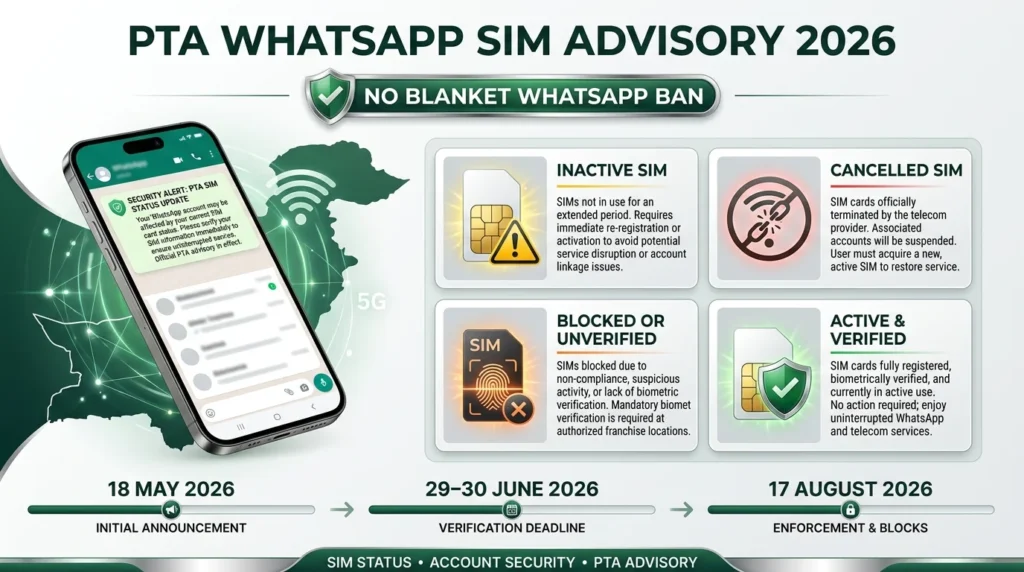
- PTA has warned about WhatsApp accounts associated with inactive, cancelled, blocked or unverified SIMs.
- The latest advisory discussed in this article was issued on 17 August 2026.
- The warnings do not announce a nationwide WhatsApp shutdown.
- There is no general deadline requiring every WhatsApp user in Pakistan to change their number.
- One of the main concerns is the reuse of cancelled mobile numbers.
- Keeping the SIM connected to your WhatsApp active and properly verified is the safest option.
- If you are unsure about the SIMs registered against your CNIC, you can check your connections through PTA’s available channels.
The important thing is to separate the actual warning from the claims being circulated online. PTA’s concern is related to the status of certain mobile connections, not a plan to switch off WhatsApp for the entire country.
What Did PTA Say About WhatsApp SIMs in 2026?
Warnings about WhatsApp and SIM status appeared at different points during 2026. The wording varied, but the general concern remained connected to active and properly verified mobile numbers.
| Date | Main warning | What users were advised to do |
| 18 May 2026 | WhatsApp access associated with unverified SIMs could face blocking | Keep the WhatsApp number active and properly registered |
| 29–30 June 2026 | Accounts connected to inactive or unregistered SIMs could face action | Move WhatsApp away from a number that is no longer active |
| 17 August 2026 | Inactive, cancelled or no-longer-used SIMs were highlighted | Keep the number active and under your control |
Why Is an Inactive SIM a Problem for WhatsApp?
The problem becomes easier to understand with a simple example.
Suppose you registered WhatsApp with a mobile number several years ago. Later, you stopped using that SIM but continued using WhatsApp with the same number.
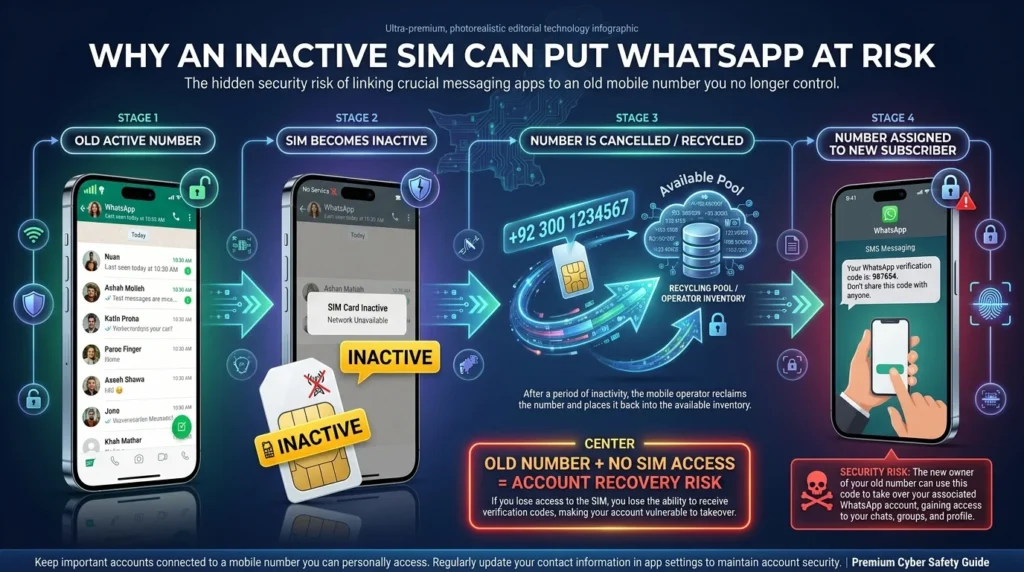
For a while, everything may appear normal.
The problem starts when the old connection becomes inactive or is cancelled. After a period of time, the operator may return that number to its available pool and eventually assign it to another customer.
That new subscriber could then receive SMS messages or verification codes sent to the number. This is why keeping an old number attached to an important account can create security and recovery problems.
This does not mean that every WhatsApp user in Pakistan is in danger. The concern is mainly with numbers that are no longer active, valid or properly verified.
Who Should Check Their WhatsApp SIM?
Most users do not need to panic. However, you should take a close look at your WhatsApp number if any of the following scenarios apply to you.
Your WhatsApp Uses an Old Number
If you no longer use the SIM but want to keep your WhatsApp account active, it is best to do so now and not later
As long as you have access to that number, changing your WhatsApp number will be much simpler.
The SIM Is Cancelled or Inactive
An inactive subscription can be cancelled and the number on which it is attached can be reassigned in the future.
If your WhatsApp account is linked to this number, you may have difficulties accessing or recovering it in the future.
The SIM Has a Verification Problem
PTA warnings also refer to unverified connections.
If there is a biometric or registration issue with your SIM, contact your mobile network operator and complete whatever verification process is required.
You No Longer Have the SIM
This is deserving of attention.
If your WhatsApp account is on a number that is on a SIM you no longer have, try to port it to a number that you can reach.
It’s safer to keep an essential account tethered to a mobile number you can access.
What If My SIM Is Active but Registered to a Family Member?
This is one of the areas where viral posts can cause unnecessary confusion.
The advisories discussed in this article do not say that every WhatsApp account using an active SIM registered to a family member will automatically be blocked.
For example, an active and properly verified SIM registered in your father’s name is not the same situation as a SIM that has already been cancelled or is no longer being used.
That said, having your own mobile connection registered under your own CNIC is generally a better long-term arrangement. It gives you clearer control over the connection and makes it easier to manage services associated with the number.
The important thing is not to assume that a family-registered SIM automatically means your WhatsApp will be blocked.
Is PTA Banning WhatsApp in Pakistan?
No.
The 2026 advisories discussed here do not suggest that there is going to be a countrywide WhatsApp shutdown.
They are in reference to accounts tied to SIMs that are inactive, cancelled, blocked or unverified. Do not read them as an announcement that WhatsApp will stop functioning for all Pakistani users.
If a WhatsApp forward says that everyone’s WhatsApp will cease to function on a certain date, do not take that date as the truth. You need to cross verify it with the original announcement.
A genuine warning can very easily be interpreted and then republished on social media as something much more alarming.
Is There a Deadline to Move WhatsApp to Your Own SIM?
No general deadline is stated in the three advisories covered in this article.
The August warning indicates that certain accounts may face blockage, but that is not the same thing as giving every WhatsApp user a fixed date by which they must change their number.
This difference is important because viral posts often turn a general security or registration warning into an urgent deadline.
If you come across a specific cutoff date online, check the original PTA announcement before taking any action.
How to Check SIMs Registered Against Your CNIC
If you feel that your old or unknown mobile connection is still connected to your identity, it is a good idea to check how many SIM connections were made on your CNIC
Read Also: How to Find all Mobile Numbers Registered on Your CNIC Pakistan 2026
Check Through SMS
Send your 13-digits CNIC (without dashes) to 668.
You will automatically receive a message about how many SIM connections are connected to your CNIC on any mobile network.
Remember to check the number that your WhatsApp account is currently connected to.
Ask yourself:
- Is the SIM still active?
- Do I still have the SIM?
- Am I still using the number?
- Has the required biometric verification been completed?
- Is the connection registered under my own CNIC?
What Should You Do If Your WhatsApp Number Is No Longer Active?
If you still have access to the old number do not wait for the SIM to get completely unusable
WhatsApp has a change number option allowing you to transfer your account to another number
You should rather take the chance and change it while you still have access to the old one. It will be a lot easier to make the switch while you can receive verification messages. Trying to recover the account if the old number is lost will be much harder.
connection can be considerably more challenging once a number has been cancelled and reassigned to another person.
For everyday security, the better setup is simple: use an active mobile number that you personally control.
PTA WhatsApp Warning and Phishing Scams
There is another issue worth keeping in mind.
Whenever an official warning becomes a major topic online, scammers often use the same warning to make fake messages look convincing.
A fraudulent message might tell you:
- Your SIM has suspicious activity.
- Your WhatsApp is about to be blocked.
- Your SIM registration needs urgent verification.
- Click a link to check your SIM.
- Send your CNIC or OTP to prevent suspension.
A message using the PTA name or logo is not automatically genuine.
Before clicking anything or providing personal information, verify the claim through a recognised official source.
Never Share Your WhatsApp OTP
Your WhatsApp verification code is private.
Do not share your WhatsApp OTP with anyone claiming to be from PTA, your mobile operator or any other official organization. The same goes for your CNIC images and biometric information. Do not provide such information on WhatsApp or any other website just because you are being threatened with blocking.
Do Not Trust Random SIM-Check Links
A link saying “Check Your SIM” in a WhatsApp forward should not automatically be trusted.
For SIM registration and account-related information, use recognised official channels rather than links sent by strangers or forwarded through social media groups.
What Should You Do After Getting a PTA WhatsApp Warning?
The first thing not to do is to start panicking or directly forward the message to yourWhatsApp contacts.
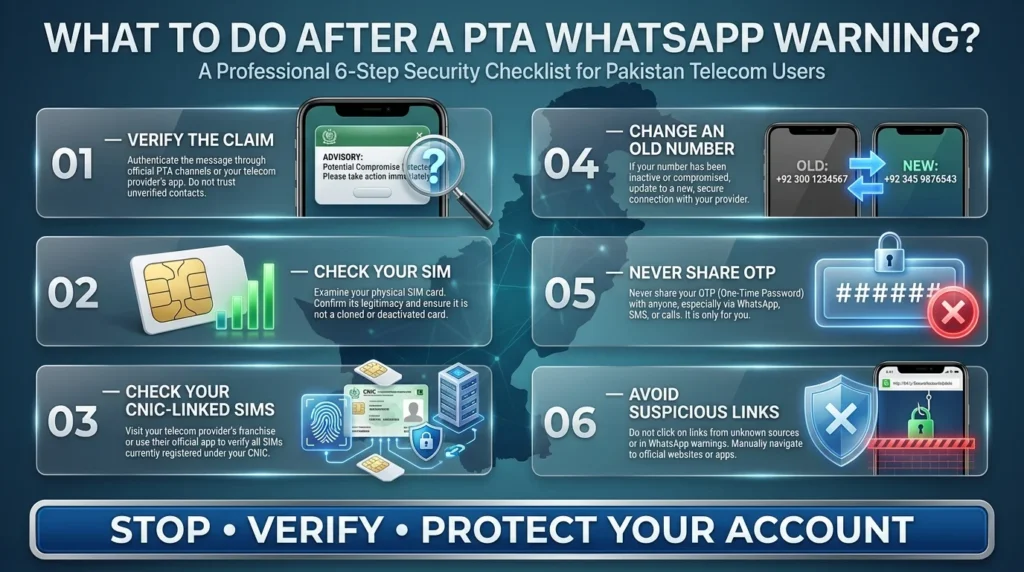
Do the following checks to see if you are indeed a victim or just being trolled by some WhatsApp fraud:
- Verify the claim through an official source.
- Check your WhatsApp number and if your SIM card is working properly. Cross-check if it is possible for the other contact to reach out to you using that number.
- If you have reason to believe it might not be your SIM that receives the message, check on the verification status of your other registered SIM cards with the telecom companies against your CNIC information.
- If you changed your phone number, move WhatsApp to your new number.
- Do not click on any suspicious links sent by the scammer asking you to verify your number or your SIM card.
- Do not share your OTP, image of your CNIC or biometric information with a random unknown number.
These simple checks will resolve most problems associated with fake PTA warnings whilst also protecting you against being a victim of WhatsApp scammers using false PTA claims as bait.
Frequently Asked Questions
Is PTA blocking WhatsApp in Pakistan?
No. The advisories mentioned in this article do not announce a widespread WhatsApp ban. They are discussing connections to inactive, cancelled, blocked or unverified SIMs.
Will WhatsApp stop working when my SIM is registered to my father?
Simply put it is not related to connections to family members.
The advisories do not declare an automatic block for every family-registered connection. The more pressing question is whether the SIM is active, valid and properly verified.
Using a number registered under your own CNIC is still a more effective long-term option because you have greater control of the connection.
Has PTA provided a deadline to change my WhatsApp number?
No general deadline appears in the three 2026 advisories mentioned here.
If a post on Facebook, WhatsApp or other platforms have given you a specific cutoff date, it is best to double-check it against the original PTA announcement.
Why is PTA concerned with inactive SIMs connected to WhatsApp?
The issue is mobile-number recycling.
When an old number is cancelled and later assigned to another subscriber, an account that remains connected to that number can pose security and account recovery risks.
How can I check SIMs registered against my CNIC?
You can send your 13 digits CNIC number (without dashes) to 668 to get the relevant SIM count by network.
What should I do with an old SIM connected to WhatsApp?
If you are no longer using the number be sure to move your WhatsApp account to an active number before it is cancelled or reassigned.
It will be much more convenient to make the change while you still have access to the old number.
Can I change my WhatsApp number without losing my account?
Yes. WhatsApp has a Change Number feature that allows you to move your account to another mobile number.
It is best to complete the process while you still have access to the number being replaced and can complete the required verification.
Conclusion
The PTA WhatsApp SIM warning is based on a real concern, but many social media posts make it sound much broader than it actually is.
There is no blanket WhatsApp ban announced in the advisories covered here, and there is no general deadline requiring every Pakistani user to move WhatsApp to a new SIM.
What deserves your attention is the condition of the number linked to your account.
The user has been contacted by WhatsApp through spam calls or messages. It is recommended to check whether the contact is from an active, valid and registered phone number.
If your SIM card is live/verified and in your possession, there is no need to take any action. However, if your old inactive/cancelled/blocked/unverified connection is being used, it is better to move WhatsApp to an active number that you currently possess.
If someone sends you a message claiming that you need to click on a suspicious link, provide an OTP (One-Time Password) or share your CNIC (Computerized National Identity Card) details, it is best to stop and verify the request through an official channel.