
Pakistan SIM Database : Official Guide, Facts & Verification
The Pakistan SIM Database is an official telecom registration system that securely stores records of active SIM cards linked to verified CNICs. It is managed by the Pakistan Telecommunication Authority (PTA) using biometric verification provided through NADRA. Many people search online for websites that claim to reveal SIM owner details by phone number. However, no public database provides this information. Only the registered subscriber can legally check SIM records linked to their own CNIC through official PTA services.
More: Check SIM Owner Details by CNIC Online in Pakistan
This guide explains how the Pakistan SIM Database works, how to verify your registered SIMs, and how to avoid fake SIM lookup websites.
What Is the Pakistan SIM Database?
- Registered number
- CNIC of the subscriber
- Mobile company
- Date of activation of the SIM card
- Biometric verification
- The subscription status
This information is considered confidential and can only be accessed by the subscriber, mobile companies, and government agencies.
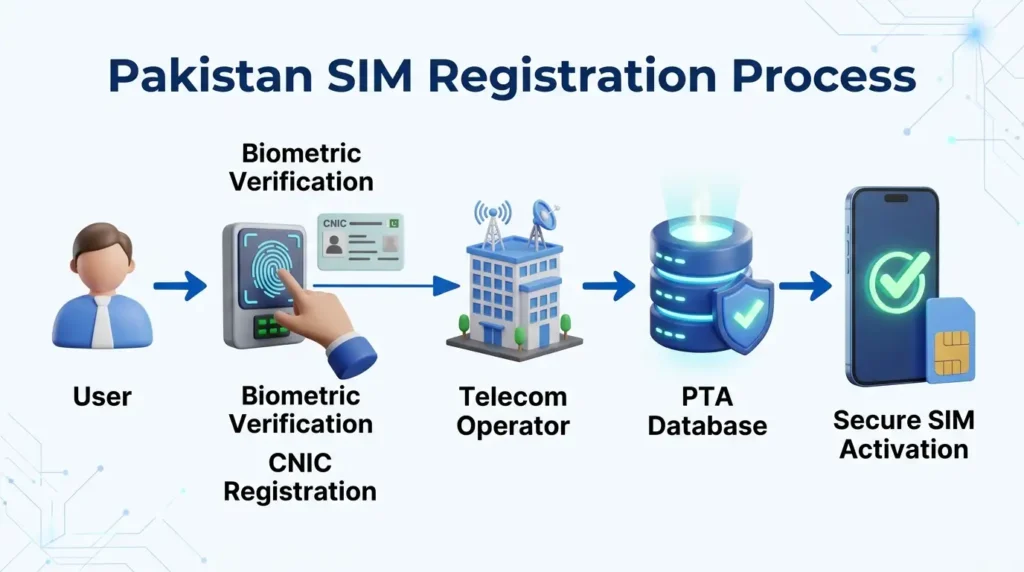
How the Registration System Works
Pakistan has taken a step up in security by introducing biometric SIM verification. This means that every time a new SIM is bought or the ownership of an existing one is transferred, the buyer’s fingerprints have to be scanned at NADRA for verification purposes.The telecom company that issued the SIM then uploads the information onto PTA’s database, which stores records of every registered SIM card in the country. The database is updated by mobile operators whenever a SIM is activated, replaced, transferred, or permanently blocked.These regular updates help maintain accurate registration records and identify unauthorised SIMs linked to a CNIC.
Official Ways to Check Your SIM Record
PTA provides several free services that allow subscribers to check their own SIM information. These are the only official methods recommended for citizens.
More: SIM Owner Detail Pakistan
1. SMS Your CNIC to 668
The fastest method is the 668 SMS service. Send your 13-digit CNIC number without dashes to 668 from any Pakistani mobile network.
Within a short time, you will receive a reply showing the total number of SIMs registered under your CNIC on each mobile operator. This service is useful for checking whether any unknown SIMs are linked to your identity.
2. Use the Official PTA Web Portal
If you need more detailed information, visit cnic.sims.pk and enter your CNIC. The portal allows users to check SIMs registered against their CNIC and view available registration information.
This method is helpful if you want to identify old numbers that may still be registered in your name.
3. Verify the SIM in Your Phone
To check mobile number portability information, send MNP to 667. This service helps users verify network-related details for a mobile number.
This service is useful when purchasing a second-hand SIM or verifying a replacement SIM before using it.
More: How to Transfer SIM Ownership Online in Pakistan
Quick SIM Verification Methods
| Method | Purpose |
| SMS 668 | Check SIMs registered on CNIC |
| PTA SIM Information System | Online verification |
| MNP 667 | Check network portability |
| IMEI 8484 | Check device status |
Check Your Phone’s IMEI Status
Apart from SIM registration, PTA also monitors mobile devices through the Device Identification, Registration and Blocking System (DIRBS). Every phone has a unique IMEI number that identifies the device on mobile networks.
To verify your phone:
- Enter *#06# on your phone’s dial pad to view your IMEI number.
- Send it to 8484.
- Now check the response and confirm that your phone is compliant.
Even if your SIM is registered correctly, your phone will not connect to mobile networks if it is not PTA compliant.
Why You Should Avoid Unofficial SIM Database Websites
Many websites claim to provide information about the owner of a Pakistani phone number. This is false advertising, as the official SIM Database is not publicly searchable.
Most unofficial websites use old information, fake data, or illegally obtained data to trick you into believing that they can provide you with the information you need. Giving these websites your CNIC information, phone number, or paying them for the information could put you at risk of identity theft or fraud.
For your own safety, only use PTA authorised websites to look up SIM information.

Is It Legal to Access Someone Else’s SIM Information?
No. SIM registration records are kept confidential on the basis of personal information. You can get information about your CNIC through official verification services.
Only authorised government agencies can access another person’s SIM registration information through legal procedures. PTA does not recognise websites that claim to provide SIM owner details, so they should not be trusted.
How to Protect Your SIM and CNIC
Your mobile number connects to important services such as banking and online accounts, so protect your SIM information to prevent unauthorised access and identity misuse.
Here is what you can do:
- Monitor your registered SIMs on PTA website regularly.
- Do not give your CNIC copy or verification code to anyone.
- Only buy SIMs from authorised dealers.
- Report any lost or stolen SIMs to your operator immediately.
- Deactivate any number you are not using.
- Use two-step verification for your online accounts.
By doing this, you can prevent any kind of identity theft and SIM cloning.
Common Myths About Pakistan SIM Databases
| Myth | Reality |
| Any website can show SIM owner details. | False. Only official PTA services let you check SIMs linked to your own CNIC. |
| A phone number reveals personal data. | No. Subscriber information is not publicly accessible. |
| All SIM lookup websites are official. | False. Many provide inaccurate information or pose privacy risks. |
Conclusion
Biometric verification ensures that every active mobile connection in Pakistan is registered to a verified subscriber. Many sites on the internet claim to offer users the ability to check SIM owner information as well, but the official database is not open to the public. If you want to check your mobile records, you should use the PTA authorised 668 SMS, SIM Information System, or check your IMEI via the DIRBS verification system.
To keep your personal information secure, regularly check the SIMs registered under your CNIC, protect your CNIC from misuse, and avoid fraudulent SIM lookup websites. In this way, you can be safe while checking your SIM records using only the officially recommended systems. This will avoid any potential misuse of information, as well as identity theft attempts online.
FAQs
How can I check the number of SIMs registered under my CNIC?
You can check the number of SIMs registered under your CNIC by sending your 13-digit CNIC (without dashes) to 668 or by using the official PTA SIM Information System. Both services will provide you the required information.
Do I need to pay any fee to use this service?
Charges, if any, may apply as per standard SMS tariff by the subscribers’ operator. This service is available to all mobile phone users in Pakistan.
Why should I check my SIM records regularly?
Checking SIM records periodically allows you to keep track of any unauthorized SIM cards registered on your CNIC. This helps you prevent any misuse of your personal information, such as SIM swap fraud, illegal transactions, and other privacy and security issues.
What is DIRBS?
DIRBS stands for Device Identification, Registration and Blocking System. PTA uses this system to identify, register, and block non-compliant mobile devices based on their IMEI numbers.