
Want to know when your SIM was registered in Pakistan? Before you start, there is an important distinction to understand: checking how many SIMs are registered on your CNIC is not the same as checking the exact registration or activation date of one particular mobile number.
PTA’s official SIM Information System shows the total number of SIMs registered against your CNIC, and the 668 SMS service does the same. Neither one shows an exact registration date for each SIM. If you need the date for a specific number, the only official route is the network that issued the SIM. This updated 2026 guide explains what each official method can and cannot tell you, for Jazz, Zong, Telenor and Ufone, so you do not waste time on websites that promise a date PTA does not publish.
Quick Answer: What Can You Actually Check?
| What you want to know | Best official method | Exact date shown? |
| How many SIMs are on your CNIC | PTA SIM Information System (cnic.sims.pk) | No |
| SIMs on your CNIC by SMS | Send CNIC number to 668 | No |
| Which network a number belongs to | PTA SIM Information System | No registration date |
| Exact registration date of your own number | The network that issued the SIM | Depends on the operator’s records |
| Activation history of a number | The network that issued the SIM | Depends on the records available |
| An unknown SIM on your CNIC | PTA and the network operator | Investigate through official channels |
The key point: 668 is a SIM ownership and count check, not an exact SIM registration-date checker. Many websites describe 668 as if it can show the complete history of a SIM. PTA’s own material describes the service as a way to check the number of SIMs issued against your CNIC, and that is all it does.
Method 1: Check SIMs on Your CNIC Through PTA’s SIM Information System
PTA’s SIM Information System is the official starting point. It does not give you a date, but it does tell you how many SIMs are registered against your CNIC and which networks they belong to, which is usually the information you actually need.
- Open the official PTA SIM Information System at cnic.sims.pk.
- Enter your CNIC number and complete the verification step.
- Check the total number of SIMs registered against your CNIC.
- Compare the result with the SIMs you actually use. If the count is higher, an unknown SIM may be registered in your name.
For a full walkthrough, see our guide on how many SIMs are registered on your CNIC.
Method 2: Check SIMs on Your CNIC by SMS to 668
If you do not have internet access, the 668 service gives you the same count by SMS:
- Open your phone’s messaging app.
- Type your CNIC number without dashes or spaces.
- Send it by SMS to 668.
- You will receive a reply showing the number of SIMs registered against your CNIC.
Remember: the 668 reply does not include registration dates, activation dates or the full mobile numbers. Anyone claiming that 668 can give you the exact date a SIM was registered is misleading you.
Method 3: Ask the Network That Issued the SIM
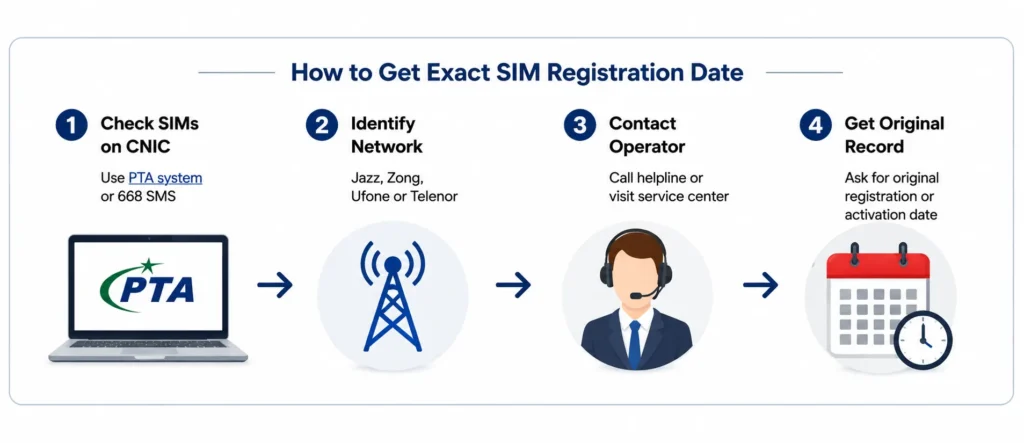
For the exact registration or activation date of your own number, contact the network that issued it. Only the operator holds the subscriber record for that number, and only it can confirm what its records show.
Before you call or visit, have your CNIC number and the mobile number ready. The operator can only discuss the account with the person whose CNIC it is registered against. If the number is not in your name, you will need the registered owner, or a proper SIM ownership transfer, before any details can be shared.
| Network | Helpline | What to ask for |
| Jazz | 111 | Registration or activation date from the subscriber record |
| Zong | 310 | Registration or activation date from the subscriber record |
| Telenor | 345 | Registration or activation date from the subscriber record |
| Ufone | 333 | Registration or activation date from the subscriber record |
Be aware that the operator may not be able to give you a date, or may only be able to confirm a limited part of the history. That depends on how long ago the SIM was issued, whether the number has been reissued, and what its records still contain. If the operator cannot help, ask in writing at a franchise so you have a record of the request.
Method 4: Check Your Own Records
Your own paperwork often answers the question faster than any system. Check the original SIM jacket or card holder, the franchise receipt, the welcome SMS or email from when the SIM was issued, and any bill or account statement that shows when the number became active. If you bought the SIM recently, the date is usually on the receipt.
Can You Check the Registration Date of Someone Else’s SIM?
No. SIM registration information is private. You can only check the SIMs on your own CNIC, and an operator will only discuss a number with its registered owner. Websites and apps that claim to show the registration date or owner of any number in Pakistan are not using official PTA data. Do not pay them, and do not enter your CNIC number or mobile number on them. If you need to check who owns a number that is contacting you, read our guide on checking SIM owner details by number for the legitimate options.
What to Do If You Find an Unknown SIM on Your CNIC
If the PTA system or the 668 reply shows more SIMs than you use, act straight away:
- Do not use the unknown number.
- Contact the operator that issued it and ask how it came to be registered against your CNIC.
- Ask for the SIM to be blocked if it is not yours.
- Keep a written record of your complaint and any reference number.
- Check again a few days later to confirm the SIM is no longer on your CNIC.
Our guide to blocking an unauthorised SIM in Pakistan explains the process in detail. PTA allows a maximum of 8 SIMs per CNIC, 5 voice and 3 data-only, so an unknown SIM also uses up one of your limited slots. See the PTA SIM rules 2026 guide for the current limits.
When the Registration Date Actually Matters
- A number you have not used for a long time: if it was deactivated and reissued, the current registration date will be the new owner’s, not yours. See our guide on reactivating a blocked SIM.
- A disputed SIM: the registration date can help show when a number was first issued, but only the operator’s record counts as evidence.
- A deceased person’s SIMs: the registration date is less important than getting the SIMs blocked. See how to block SIMs on a deceased person’s CNIC.
- A SIM you suspect was issued without your knowledge: check the count first, then ask the operator.
Conclusion
PTA’s official tools, the SIM Information System and the 668 SMS service, tell you how many SIMs are registered on your CNIC, not the exact date each one was registered. That is a useful check, and it is the check you should do first. For the exact registration date of your own number, ask the network that issued the SIM, with your CNIC in hand. And if a website promises the registration date of any number for a fee, it is not an official service — do not use it.
FAQs: SIM Registration Date in Pakistan
Can I check my SIM registration date by SMS to 668?
No. Sending your CNIC to 668 tells you how many SIMs are registered against your CNIC. It does not show the registration date of any individual SIM.
Does cnic.sims.pk show the SIM registration date?
No. The PTA SIM Information System shows the total number of SIMs on your CNIC. For a date, you need to contact the operator that issued the SIM.
How can I find the activation date of my Jazz, Zong, Telenor or Ufone SIM?
Call the operator’s helpline or visit a franchise with your original CNIC and ask for the registration or activation date from the subscriber record. Whether a date is available depends on the operator’s records.
Can I check the registration date of a SIM that is not in my name?
No. Operators only share account details with the registered owner. You can, however, check the SIMs on your own CNIC and block any that are not yours.
Is there any app or website that shows SIM registration dates?
No official app or website does this. Any service claiming to show the registration date of any number is not using official PTA data.
Sources: Pakistan Telecommunication Authority, pta.gov.pk; PTA SIM Information System, cnic.sims.pk; Jazz, Zong, Telenor and Ufone helplines. Checked on 16 November 2026.