
Check Ufone SIM Owner Details Online (Official Guide 2026)
Checking your Ufone SIM Owner Details is very important to keep your mobile number safe. If you want to confirm that your SIM is linked to your own CNIC and check how many Ufone SIMs are registered on your CNIC, or update your registration details, always use the Official Verification Methods.
Many websites claim that they can show the personal details of any mobile number. However this is not accurate and legal. In Pakistan personal information is protected by privacy laws and only official channels allow you to verify SIMs connected to your own CNIC or account.
In this guide you will learn the official ways to check Ufone SIM owner details, verify your SIM registration, and solve common issues in simple and easy steps.
More: SIM Owner Detail Pakistan
Quick Answer
| Method | Best For | Time Required |
| PTA SIM Information System | Checking SIMs registered on your CNIC | 2–5 minutes |
| My Ufone App | Viewing your account information | 2 minutes |
| Ufone Franchise | Ownership verification and updates | 15–30 minutes |
| Ufone Customer Support | General account assistance | 5–10 minutes |
What Is Ufone SIM Owner Verification?
Ufone SIM owner verification is the process of confirming that a Ufone SIM card is registered under the correct person’s CNIC. This helps prevent fraud, identity misuse, and unauthorized SIM registrations.
Every SIM card in Pakistan must be registered through biometric verification according to PTA regulations. This process links the SIM to the owner’s CNIC, making mobile services safer for everyone.
What Are Ufone SIM Owner Details?
SIM owner details usually include information related to the registered account, such as:
- Registered CNIC
- Mobile number
- Network operator
- SIM registration status
Who Can Check Ufone SIM Owner Details?
Only the registered owner can verify information linked to their SIM or CNIC through official channels.
You can check:
- SIMs registered under your own CNIC
- Your own Ufone account information
- Registration status of your active Ufone SIM
Is It Legal to Check Ufone SIM Owner Details?
Yes, checking your own SIM registration is completely legal.
However, attempting to obtain another person’s private registration information without permission may violate privacy laws.
For this reason, always rely on official Ufone and PTA services rather than websites that promise access to someone else’s personal information.
Official ways to Check Ufone SIM Registration
There are several safe and official ways to verify your Ufone SIM registration.
More: Check SIM Information Online – Complete Guide
Check Through the PTA SIM Information System
Steps
- Open the official PTA SIM Information System.
- Enter your CNIC number without dashes if required.
- Complete the verification process.
- View the number of active SIMs registered under your CNIC.
Best For
- Checking registered SIMs
- Finding unauthorized registrations
- Confirming CNIC records
Check Through the My Ufone App
The My Ufone App allows existing customers to manage their mobile account from their smartphone.
Steps
- Install the My Ufone App.
- Sign in using your Ufone number.
- Verify your account if requested.
- Open your account dashboard.
- View your registered mobile information and available services.
Besides checking account information, the app also allows you to:
- View remaining balance
- Buy internet packages
- Activate offers
- Check call history
- Manage account settings
Benefits of Using the My Ufone App
Some advantages include:
- Available anytime
- Easy to use
- Secure login
- Fast account management
- No need to visit a franchise for basic information
Steps to Verify Your SIM at a Ufone Franchise
- Visit your nearest Ufone franchise or customer service center.
- Carry your original CNIC.
- Provide your Ufone mobile number.
- Complete biometric verification using your fingerprint if requested.
- The representative will verify your SIM registration and assist you with any required updates.
This method is especially useful if your SIM is facing registration issues or if you need in-person support.
Best For
- SIM ownership verification
- Biometric verification
- SIM replacement
- Ownership transfer
- Updating personal information
Documents Required
Before visiting a franchise, make sure you have:
- Original CNIC
- Active Ufone SIM
- The mobile phone containing the SIM (if possible)
- Fingerprint for biometric verification
Contact Ufone Customer Support
If you face any difficulty in your Ufone SIM registration, call the Ufone customer support to resolve your issues.
You Can Contact Support Through
- Ufone helpline
- Live chat (if available)
- Email support
- Official social media support channels
Customer support can help with:
- SIM registration questions
- Account verification
- SIM replacement guidance
- Blocked SIM issues
- Ownership-related queries
SMS Verification
In some cases, telecom operators may provide SMS-based services to verify account or SIM information.
If such a service is available, always use the official instructions provided by Ufone.
General Process
- Open your phone’s messaging app.
- Enter your CNIC number
- Send the message to 668
- Wait for the verification response.
Before using any SMS service, confirm the latest instructions through Ufone’s official website or customer support.
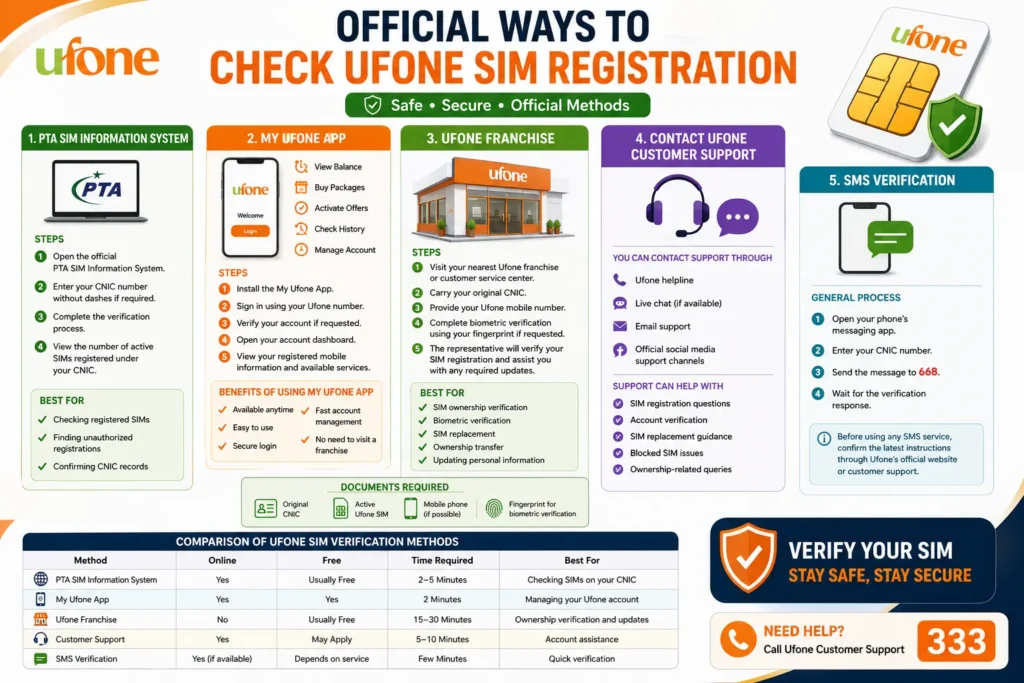 Comparison of Ufone SIM Verification Methods
Each verification method serves a different purpose. The table below can help you choose the right option.
| Method | Online | Free | Time Required | Best For |
| PTA SIM Information System | Yes | Usually Free | 2–5 Minutes | Checking SIMs on your CNIC |
| My Ufone App | Yes | Yes | 2 Minutes | Managing your Ufone account |
| Ufone Franchise | No | Usually Free | 15–30 Minutes | Ownership verification and updates |
| Customer Support | Yes | May Apply | 5–10 Minutes | Account assistance |
| SMS Verification | Yes (if available) | Depends on service | Few Minutes | Quick verification |
What to Do If You Find an Unknown SIM
If an unfamiliar SIM appears under your CNIC, don’t ignore it.
Follow these steps:
1. Contact Ufone
Inform customer support about the unauthorized registration.
2. Visit a Franchise
A representative can verify your identity and investigate the issue.
3. Complete Biometric Verification
You may be asked to confirm your identity through fingerprint verification.
4. Request Removal
If the SIM does not belong to you, ask the operator about the official process for removing it from your CNIC.
More: Block Unauthorized SIM Online in Pakistan
How to Transfer Ufone SIM Ownership
Sometimes a SIM needs to be transferred to another person. This commonly happens when:
- A family member starts using the SIM permanently
- A business number changes ownership
- The original owner no longer needs the connection
Who Can Transfer Ownership?
Generally, both the current owner and the new owner may need to be involved in the process. Identity verification is required to protect both parties.
Documents Required for Transfer Ownership
You may need:
- Original CNIC of the current owner
- Original CNIC of the new owner
- The Ufone SIM
- Biometric verification
Requirements can vary depending on Ufone’s current policies, so it’s best to confirm before visiting.
Ownership Transfer Process
The process usually includes the following steps:
- Visit a Ufone franchise.
- Provide the required documents.
- Verify the identities of both parties.
- Complete biometric verification.
- Submit the ownership transfer request.
- Wait for confirmation from Ufone.
After approval, the SIM will be registered under the new owner’s CNIC.
Benefits of Keeping Your SIM Properly Registered
Maintaining correct SIM registration offers several advantages.
Better Security
Your mobile number remains protected against unauthorized changes.
Easier Customer Support
Verified account holders can receive assistance more quickly.
Faster SIM Replacement
If your SIM is lost or damaged, replacement is easier when registration details are correct.
Protection Against Fraud
Correct registration helps reduce the risk of identity misuse.
Smooth Ownership Updates
Future ownership transfers become simpler when records are already accurate.
Tips for Safe SIM Verification
Whenever you check your SIM registration, keep these safety tips in mind.
Use Official Sources Only
Always use official PTA and Ufone services to verify your SIM details.
Never Share Your OTP
Verification codes are private. Never share them with anyone, even if they claim to be from customer support.
Protect Your CNIC
Your CNIC is sensitive personal information. Avoid entering it on unknown websites.
Keep Your Contact Information Updated
If you change your phone number or personal details, update them through official Ufone channels.
Check Your SIMs Regularly
It is a good habit to verify the SIMs registered under your CNIC every few months. This helps you identify any unauthorized registrations before they become a problem.
Common Mistakes to Avoid
Many users make small mistakes during the verification process.
Avoid these common errors:
- Using unofficial websites that claim to reveal private owner details
- Sharing your CNIC with untrusted sources
- Ignoring suspicious SMS messages
- Forgetting to remove inactive SIMs linked to your CNIC
Staying cautious helps keep your mobile account secure.
Why Official Verification Matters
Official verification methods provide reliable information while protecting your privacy. They also ensure that your personal data is handled according to Pakistan’s telecommunications regulations.
Using trusted services helps you:
- Confirm your SIM registration
- Detect unauthorized SIMs
- Protect your identity
- Resolve account issues more quickly
Common Problems While Checking Ufone SIM Owner Details
| Problem | Solution |
| SIM Not Registered | Visit a Ufone franchise with your original CNIC and complete biometric verification. |
| Incorrect CNIC | Enter the correct CNIC linked to your Ufone SIM. |
| Biometric Verification Failed | Try scanning again or visit a Ufone franchise for assistance. |
| SIM Blocked | Contact Ufone customer support or visit a franchise to reactivate your SIM. |
| Can’t Log In to My Ufone App | Check your login details, reset your password, or update the app. |
| No Verification Response | Wait a few minutes, check your internet connection, and try again. If the issue continues, contact Ufone support. |
Conclusion
Visit the official PTA website to check your Ufone SIM owner details. Avoid using unofficial third party websites that claim to give complete details of any SIM owner. They can misuse your personal information. If you need any help visit the Ufone Franchise or call the Ufone Customer Support 333.
FAQs
Can I check another person’s Ufone SIM details?
No, you cannot check another person’s personal details because personal information is protected under privacy laws.
What should I do if my SIM verification fails?
Visit the network Franchise and request them to reverify your SIM verification.
Why should I check my SIM registration regularly?
Regularly checking your SIM helps you to protect your personal information from any scam or financial fraud.
Can I update my registration details?
Yes. Visit a Ufone franchise if you need to update your registered information.