
SCOM SIM Owner Details: How to Check SCOM SIM Registration in 2026
As a SCOM SIM user, it is essential to ensure that the connection is registered under your CNIC as an old SIM, transferred connection, or number that you no longer use could sometimes remain connected to your identity.

SCOM mostly serves customers in Azad Jammu & Kashmir (AJK) and Gilgit-Baltistan (GB) and instead of using websites that promise to reveal private subscriber information about anyone, it would be better to rely on official SIM verification methods.
The main ways for checking SCOM SIM registration are 668, 667 MNP, the PTA SIM Information system, and authorised SCOM service points.
What Is SCOM?
SCOM is the mobile telecom brand owned by Special Communications Organization (SCO).
While its network spans across AJK and Gilgit-Baltistan region, it holds significant presence in potentially difficult terrains and inaccessible areas where even the mountainous topography and isolated settlements pose a challenge.
In contrast to private players like Jazz, Zong, Telenor and Ufone that operate on national level, SCOM is more regionally focused.
What Does SCOM SIM Owner Details Mean?
The term SCOM SIM Owner Details can refer to several things, including:
- Checking whether a SCOM SIM is registered against your CNIC
- Finding the number of SCOM connections linked to your identity
- Checking the network associated with a SIM
- Dealing with an unfamiliar SCOM connection on your CNIC
However, official verification services are designed for checking your own SIM registrations. They are not public databases for obtaining another person’s private name, CNIC or subscriber information.
Be cautious of websites promising complete SIM owner details through unofficial databases.
How to Check SCOM SIM Owner Details
1. Check Your CNIC Through 668
If your goal is to find out how many SIMs are registered against your CNIC, 668 is the most relevant option.
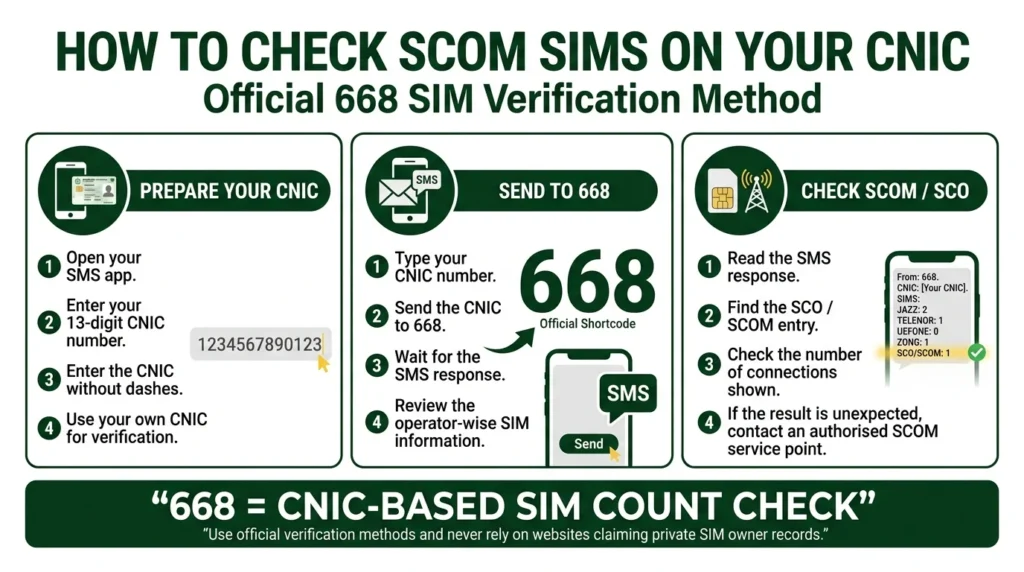
Follow these steps:
- Open your phone’s SMS application.
- Enter your 13-digit CNIC number without dashes.
- Send it to 668.
- Wait for the response.
- Review the operator-wise SIM information.
- Look for the SCO/SCOM entry.
The 668 service is mainly useful for checking the SIM count associated with your CNIC. If the SCOM count is higher than expected, contact an authorised SCOM channel instead of using an unofficial lookup website.
2. Send MNP to 667
If you already have the SCOM SIM in your phone, you can also use the MNP service.
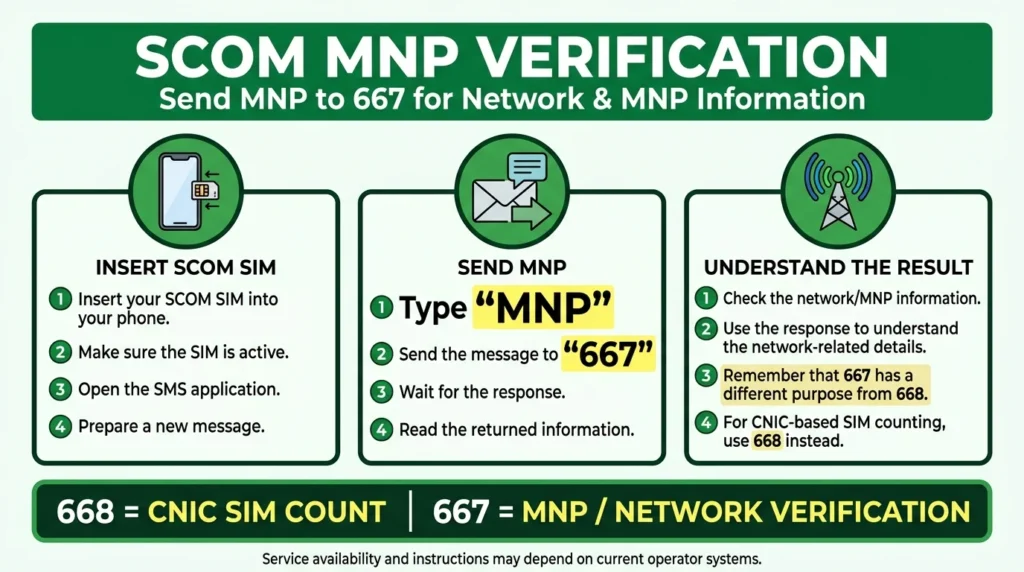
Simply:
- Insert your SCOM SIM.
- Open the SMS app.
- Type MNP.
- Send it to 667.
- Check the reply.
The purpose of 667 is different from 668. 668 is primarily for CNIC-based SIM counting, while 667 is related to MNP and network verification.
3. Use the PTA SIM Information System
You can also check SIM information through the PTA SIM Information System.
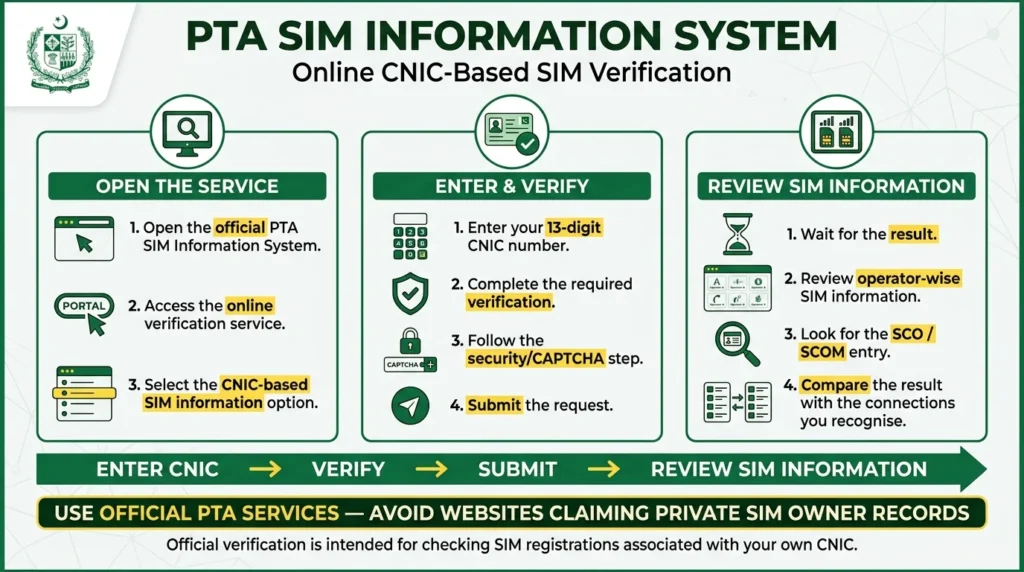
The general process is:
- Open the official PTA SIM information service.
- Enter your CNIC number.
- Complete the required verification.
- Submit the request.
- Review the operator-wise SIM information.
- Check whether an SCO/SCOM entry appears.
Use the official PTA service and avoid third-party websites claiming to provide private SIM owner records.
4. Visit an Authorised SCOM Service Point
Some registration problems cannot be solved through an SMS or online check.
Visit an authorised SCOM/SCO service point if you need help with:
- SIM ownership
- SIM replacement
- Biometric verification
- Disowning a SIM
- An unfamiliar SIM registered against your CNIC
- Registration-related problems
Take your original valid CNIC with you. Biometric verification may be required depending on the request.
Which SCOM SIM Verification Method Should You Use?
| What You Want to Check | Best Option |
| SIMs registered against your CNIC | 668 |
| Network/MNP information | 667 |
| Online CNIC-based verification | PTA SIM Information System |
| Ownership or biometric issue | SCOM service point |
| Unknown SCOM registration | SCOM service point |
In simple terms, use 668 for the broader CNIC check and an authorised SCOM service point when you need to resolve an actual registration problem.
Does SCOM Have a Separate CNIC Check Code?
There is no separate SCOM-specific CNIC shortcode identified in the information covered here for checking all SCOM connections.
For SIM-count verification, 668 is the relevant service. For MNP or network-related verification, 667 can be used.
So, if your main question is “Is a SCOM SIM registered against my CNIC?”, start with 668.
Where Does SCOM Operate?
SCOM is primarily associated with AJK and Gilgit-Baltistan.
Its services are associated with areas such as:
AJK: Muzaffarabad, Bagh, Rawalakot, Kotli, Mirpur, Bhimber, Haveli, Hattian Bala and Neelum.
Gilgit-Baltistan: Gilgit, Skardu, Hunza, Ghizer, Diamer, Astore, Ghanche, Shigar and Kharmang.
Actual coverage can vary depending on the location, topography and network congestion.
Can a SCOM SIM Work Outside AJK and GB?
Yes. SCOM SIMs can work outside their primary coverage region through applicable roaming arrangements.
Availability can depend on the location and current roaming arrangements, so users travelling outside AJK or GB should confirm the current service conditions before relying on the connection.
SCOM Number Prefixes
Some SCOM-associated number ranges include:
| Prefix | Network |
| 0581 | SCOM |
| 0582 | SCOM |
| 0583 | SCOM |
| 0584 | SCOM |
| 0325 | SCOM |
| 0355 | SCOM |
A prefix should not be treated as final proof of the current network because Mobile Number Portability (MNP) allows numbers to move between operators.
SCOM SIM Registration and CNIC
SCOM SIM registration follows the wider SIM registration framework applicable in Pakistan. Subscriber identity verification and biometric procedures are part of the registration process.
The information covered in this guide identifies an overall 8-SIM limit per CNIC, described as 5 voice and 3 data connections. Telecom policies can change, so confirm the latest requirement through official PTA or SCOM channels before making a registration decision.
What If an Unknown SCOM SIM Appears on Your CNIC?
If a SCOM connection appears against your CNIC that you do not recognise, do not ignore it.
First, save your verification result or take a screenshot. Then identify which connections you recognise and which one appears unfamiliar.
Next, visit an authorised SCOM/SCO service point with your original CNIC and explain the situation.
A simple checklist is:
- Save the verification result.
- Identify the SIMs you recognise.
- Visit an authorised SCOM service point.
- Explain the unfamiliar registration.
- Complete any required biometric verification.
- Keep the receipt or official confirmation provided.
If the issue cannot be resolved through the operator, use the appropriate official PTA complaint channel.
Understanding the 365-Day SIM Rule
The information covered here refers to a 365-day restriction related to SIM transfer or disown procedures under 2026 policy information.
This should not be taken as a reason to delay reporting an unfamiliar SIM. If a connection is registered against your CNIC without your knowledge, contact the relevant official channel and ask how the current rule applies to your situation.
What Does SCO Mean in SIM Records?
SCO stands for Special Communications Organization, the organisation associated with SCOM.
This is why a SIM verification result may show SCO even though users commonly know the mobile service as SCOM.
Seeing SCO in a SIM-related result does not automatically mean that it represents a different mobile operator.
SCOM at a Glance
| Information | Details |
| Organisation | Special Communications Organization |
| Mobile Brand | SCOM |
| Main Regions | AJK & Gilgit-Baltistan |
| CNIC Verification | 668 |
| MNP Verification | 667 |
| Helpline | 1236 |
| Digital Service | S-Paisa |
| SIM Registration | Biometric verification |
Frequently Asked Questions
How can I check SCOM SIM owner details?
For checking SIMs associated with your CNIC, use 668. If you already have the SCOM SIM and need MNP/network-related information, send MNP to 667.
What code checks SCOM SIMs on a CNIC?
Use 668 for the general SIM-count verification service. There is no separate SCOM-specific CNIC shortcode identified in the information covered here.
Can I check another person’s SCOM SIM owner name online?
Official SIM verification systems are not intended to provide another person’s private subscriber information. Avoid websites claiming unauthorised access to SIM owner names or CNIC records.
What does the abbreviation SCO mean against the result of a SIM?
This term is used for Special Communications Organization, which is the organization behind SCOM mobile service.
How many SIM cards can be registered from a single CNIC?
The information provided here refers to a maximum of 8 SIM cards, 5 for voice and 3 for data connections. It is recommended to verify the most recent regulations directly since telecommunication policies are subject to change.
What should I do if an unknown SCOM SIM appears on my CNIC?
Save your verification result and visit an authorised SCOM service point with your original CNIC. Ask the representative about the applicable process for resolving or disowning the unfamiliar connection.
Can a SCOM SIM work outside AJK and GB?
Yes. SCOM SIMs can work outside their primary regional coverage through applicable roaming arrangements, although availability depends on location and network conditions.
Final Thoughts
Checking of SCOM SIM Owner Details is not available on illegitimate SIM lookup websites.
To check how many SIMs are registered under your CNIC, dial 668# and follow the instructions. In case you are a SCOM subscriber and need to check any MNP-related information, dial 667#.
However, to change any details, conduct a biometric verification, replace a SIM card, or remove an unknown registration, you will have to visit an official SCOM service centre.
Most importantly, remember to always keep your SIM owner details updated and only use legal telecom operators’ services to manage or change any information.